A living room office combo is about blending a working surface into shared space instead of claiming a whole room. This guide plans a standing desk setup that fits a living room: matching the decor, staying quiet, hiding cables, and giving you sit-stand health without walling off the house. The CreatorOne and CyberOne Modular ranges are the reference frames, using specs from their official pages.

1. You Don't Need a Spare Room
Most homes do not have a free bedroom, and renting one for an office is wasteful if you only work a few hours a day. A sit-stand desk earns its place in the living room because it doubles as a surface: lowered, it reads as a side table or console; raised, it is a full standing workstation. The health case for sit-stand does not require a dedicated office, just a spot you can stand at.
2. Choose a Desk That Blends In
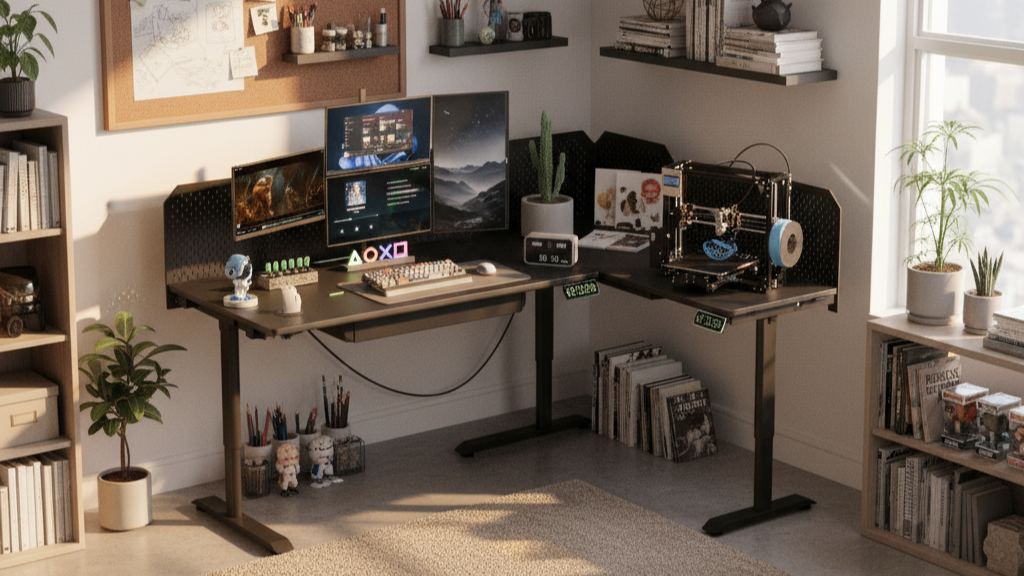
In a shared room, looks decide whether the desk stays or gets banished. Pick a neutral frame finish and a top that matches nearby furniture; a standard Main top on the CreatorOne range runs about 31.5″ deep, compact enough to tuck into a corner. If you want a soft room divider, step up to an L-shape (86.6 × 63.0″) that sits against a wall and reads as built-in.

-
Standard Main top: ~31.5″ deep, fits a corner without dominating it.
-
L-shape: 86.6 × 63.0″, a visual divider that still leaves the room open.
Match the size to the wall you actually have.
3. Height for Day-and-Night Use
The range is what lets the desk vanish when work ends. The CreatorOne range travels 30.3–47.2″; CyberOne Modular travels 29–47″. Drop it to the low end and it sits at console height while guests are over; raise it to stand for calls and focus. Both clear a seated work pose and a standing one for most heights, so the same desk serves morning emails and evening downtime.
4. Keep Noise and Cables Out of Sight
A living room desk lives where people relax, so it has to stay quiet and clean. Electric lift on CreatorOne and CyberOne Modular both runs at ≤50 dB, quiet enough not to interrupt a conversation. Route the cables once and hide them: down the leg channel or an under-desk tray, clear of the path the desktop travels, so the room never shows a tangle of cords.

5. Modules That Don't Shout
Smart add-ons help without turning the living room into a tech bench. On CyberOne Modular, the multi-port charging station ($89) consolidates phone, tablet, and laptop power into one drop instead of a row of wall warts; the pegboard (requires the base panel) hides gear and cables off the surface. RGB is optional. In a shared room, keep it subtle or off so the desk stays part of the decor.
6. Zone It Without Walls
You separate "office" from "living room" without building a wall:
- A rug under the desk marks the work zone visually.
- A floor or desk lamp over the corner tells the eye this is a task area.
- An L-shape does double duty, its return acting as a low divider between the desk and the sofa.
None of these claim floor area permanently, so the room still works for everything else.
FAQ
Can you set up a home office in your living room?
Yes. A compact sit-stand desk in a corner gives you a real workstation by day and reads as furniture by night. The key is a neutral look, hidden cables, and a height range that lets it drop to console height when work is done.
How do I hide a desk in the living room?
Lower it to console height, match the frame and top to nearby furniture, and route every cable down the leg or an under-desk tray. A rug and a lamp define the zone so it looks intentional rather than temporary.
What desk works in a shared living space?
A standard 31.5″-deep Main top tucks into a corner; an L-shape doubles as a room divider. Both the CreatorOne and CyberOne Modular frames lift quietly (≤50 dB and ~55 dB) and travel low enough to disappear when guests arrive.
Ready to build the combo?
Compare the CreatorOne frames and the CyberOne Modular configurator, and see the full module list in the accessories collection.
Keep reading: